Skip to content

Software access governance

Stop approving software access in email threads.

SoftTrak puts software access requests, approvals and removals in one tracked process, so you can see who asked, who said yes, and who has access today.

Illustration with sample data: an access request for Northstar CRM, approved by a manager and by Information Security Review, then granted by the application's Access Owner.

The problem

A contractor's last day was Friday.

On Monday, nobody can say which apps they can still sign in to, or who approved that access in the first place.

When software access is handled in email, chat and spreadsheets, the basic questions get hard to answer:

  1. Who asked for access, and to what?
  2. Who approved it?
  3. Was the access actually granted?
  4. What changed when someone moved roles or left?
  5. Can you show the history of those decisions?
Today, access requests, approvals and removals are spread across email, chat and spreadsheets. With SoftTrak the same request has one timeline: who asked, who approved, who granted it, and when it ends.

How it works

From request to removal, in one place.

Five steps every access change follows. People do the work; SoftTrak keeps it moving and keeps the history.

  1. Request

    Someone picks an app from your organization's catalog and asks for access, or asks for a missing app to be added.

  2. Review

    The request follows the approval path you set: a manager, the app's business owner, or approver roles you define.

  3. Fulfill

    The app's Access Owner makes the change in the application and marks it done in SoftTrak.

  4. Record

    Each step is added to the request's timeline, with who acted and when.

  5. Revoke

    When someone leaves or access should end, removal is a tracked request too, with an owner and a status.

What happens to one request

A sample request at Larkspur & Co., a sample organization.

Request

Priya, a sales analyst, finds Northstar CRM in the catalog, asks for Editor access and writes a line on why she needs it.

Review

Her manager, Dana, gets an email and approves. Northstar's approval path adds an Information Security Review step, so Sam approves next.

Fulfill

Lena, Northstar's Access Owner, adds Priya inside Northstar and marks the request done in SoftTrak.

Record

The request's timeline now shows who asked, who approved, who granted, and when each of them acted.

Revoke

Dana gave the access an end date. A few days before it, Priya gets a reminder; when it passes, SoftTrak records the access as ended and tells her.

Features

Everything an access change needs, and nothing it doesn't.

A catalog people actually use

Everyone sees your organization's application catalog and can request access in a couple of clicks. Can't find an app? Ask for it to be added.

For your team
People know where to ask, and can follow their request from start to finish.
For your organization
Requests stop living in inboxes and chat threads.
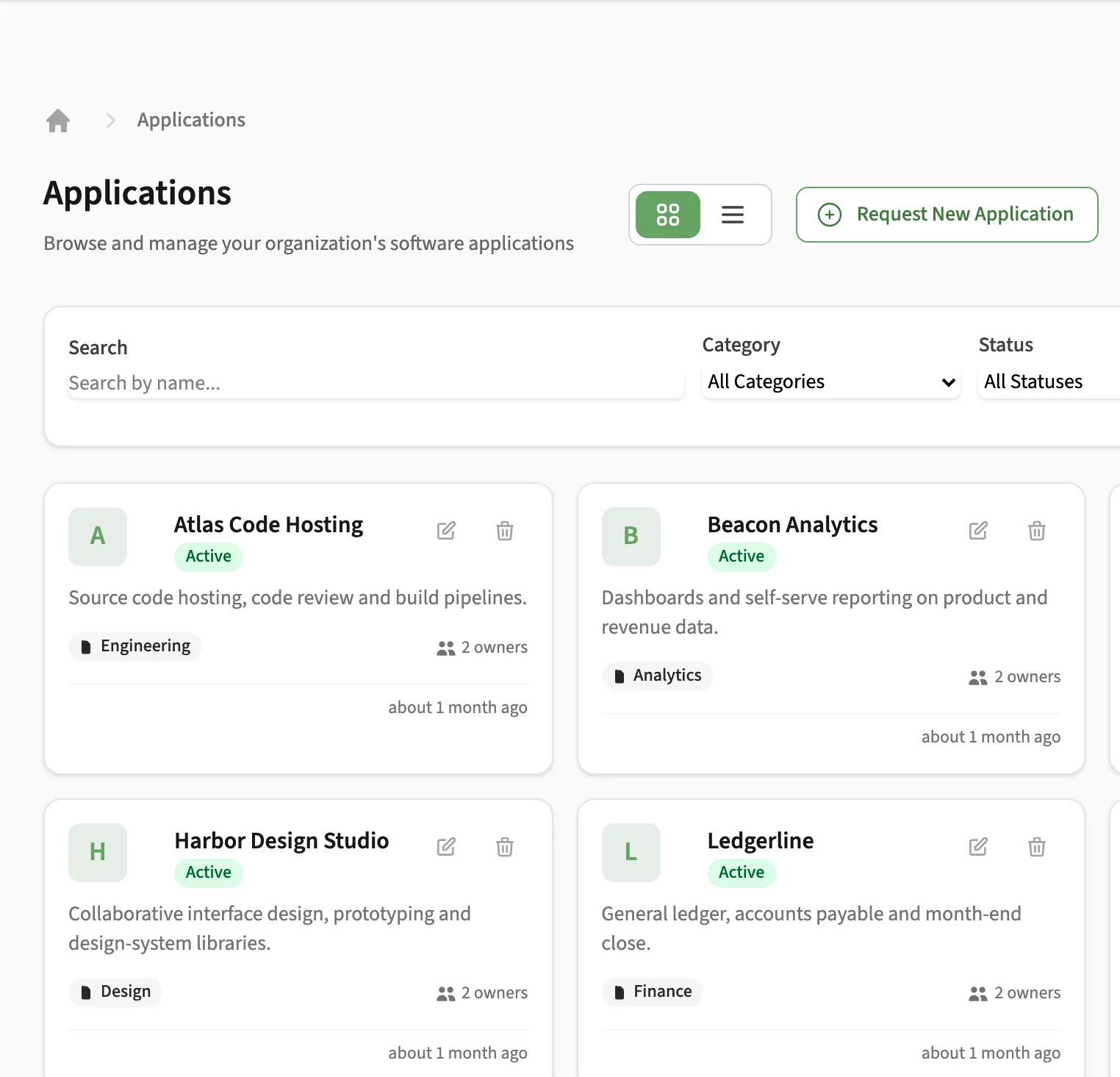
SoftTrak application catalog for the sample organization Larkspur & Co.
Sample organization: Larkspur & Co.

Approvals that fit how you work

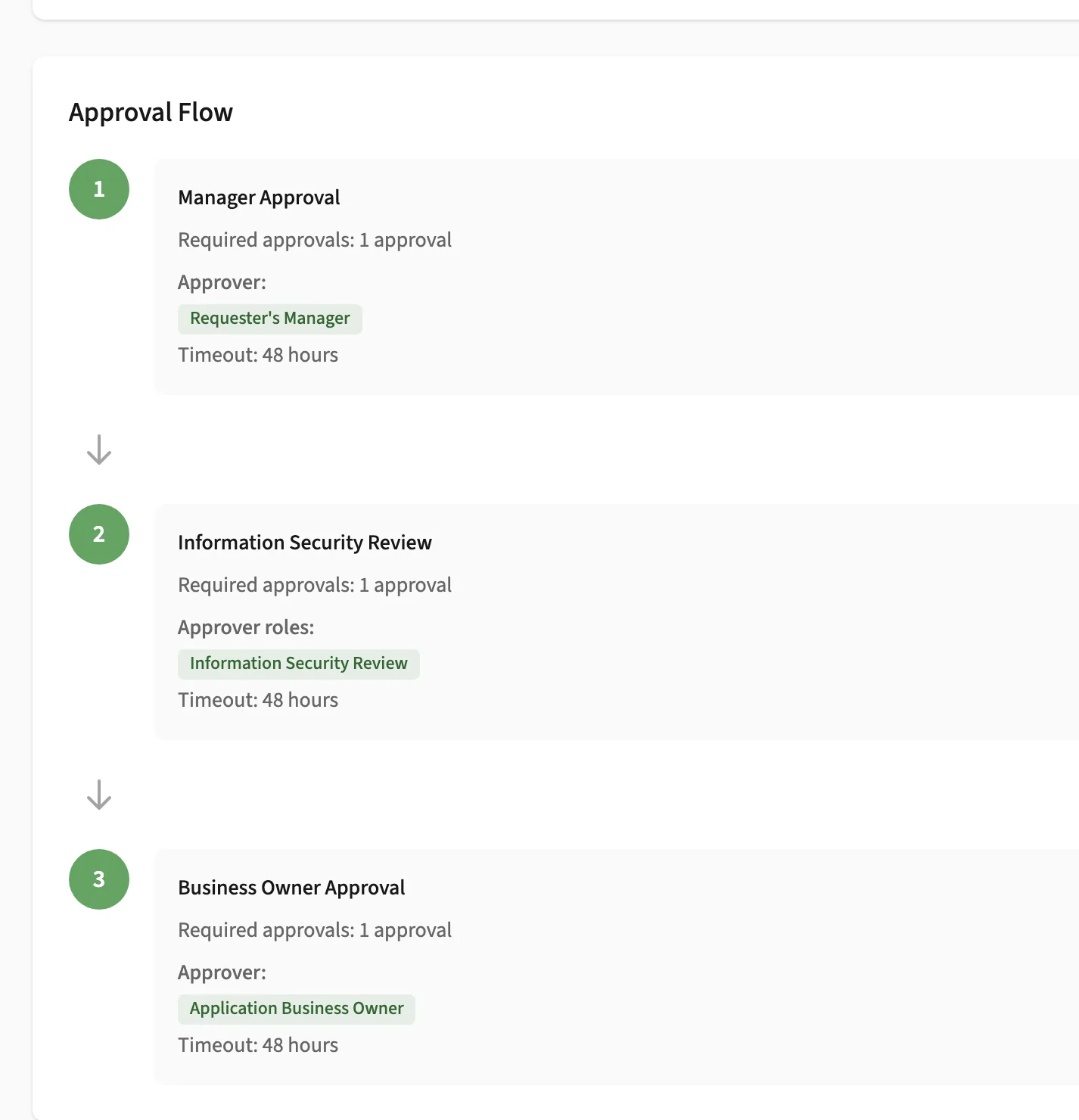
Build multi-stage approval paths from direct managers, skip-level and department managers, the app's business owner, or approver roles you create, such as Information Security or Finance.

For your team
Approvers get an email when it's their turn and can approve several requests at once.
For your organization
Your policy decides who approves, not whoever happens to be copied on the email.
An approval path in SoftTrak with manager and Information Security Review stages, sample organization
Sample organization: Larkspur & Co.

Follow-through you can see

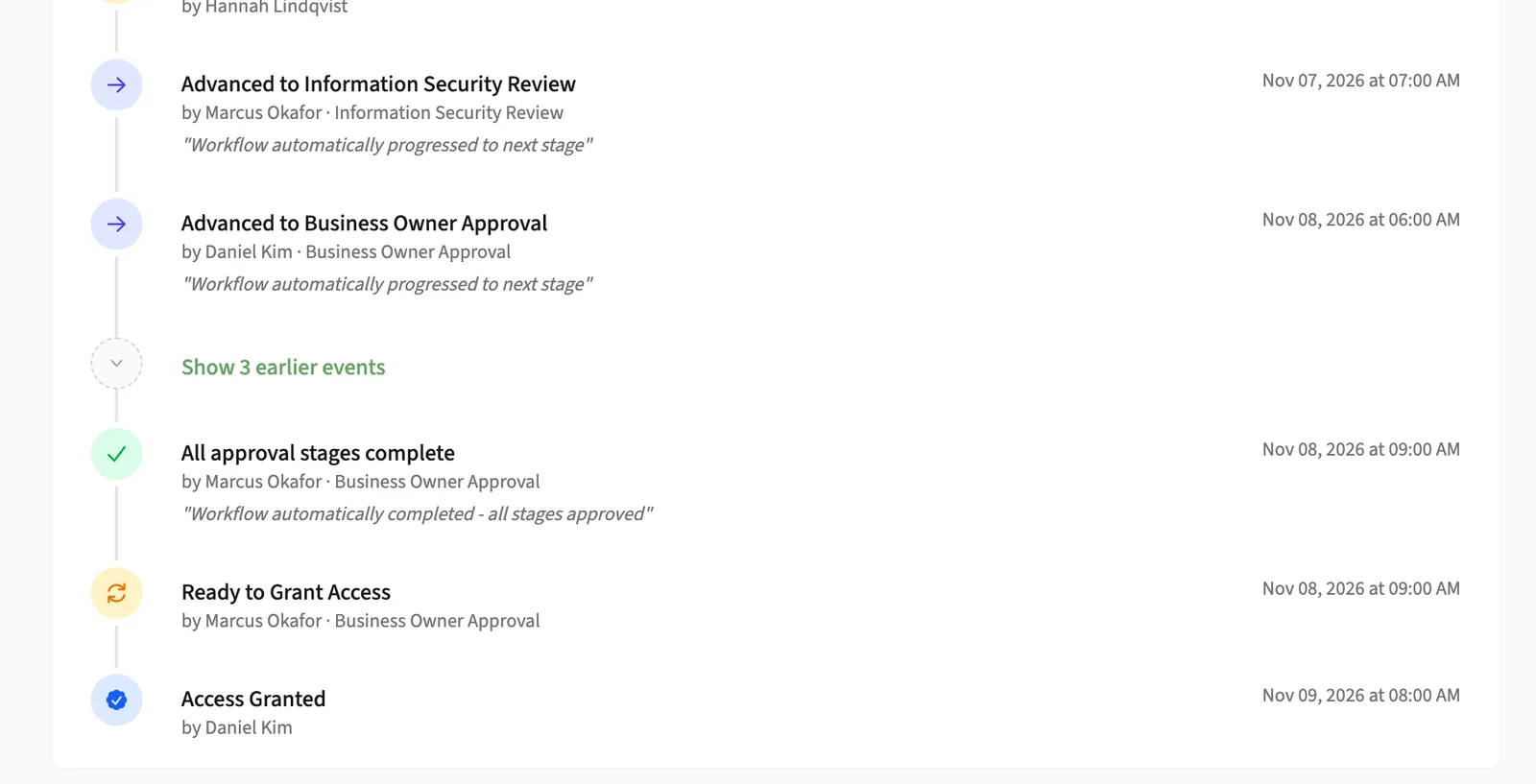
Approval isn't the end. The Access Owner makes the change and marks it done, and an approver can give access an end date, with a reminder before it lapses.

For your team
Access Owners get an email when an approved change is ready for them.
For your organization
Approved and actually granted are no longer the same guess.
A SoftTrak access request showing its full timeline from request to provisioning, sample organization
Sample organization: Larkspur & Co.

Offboarding with nothing left behind

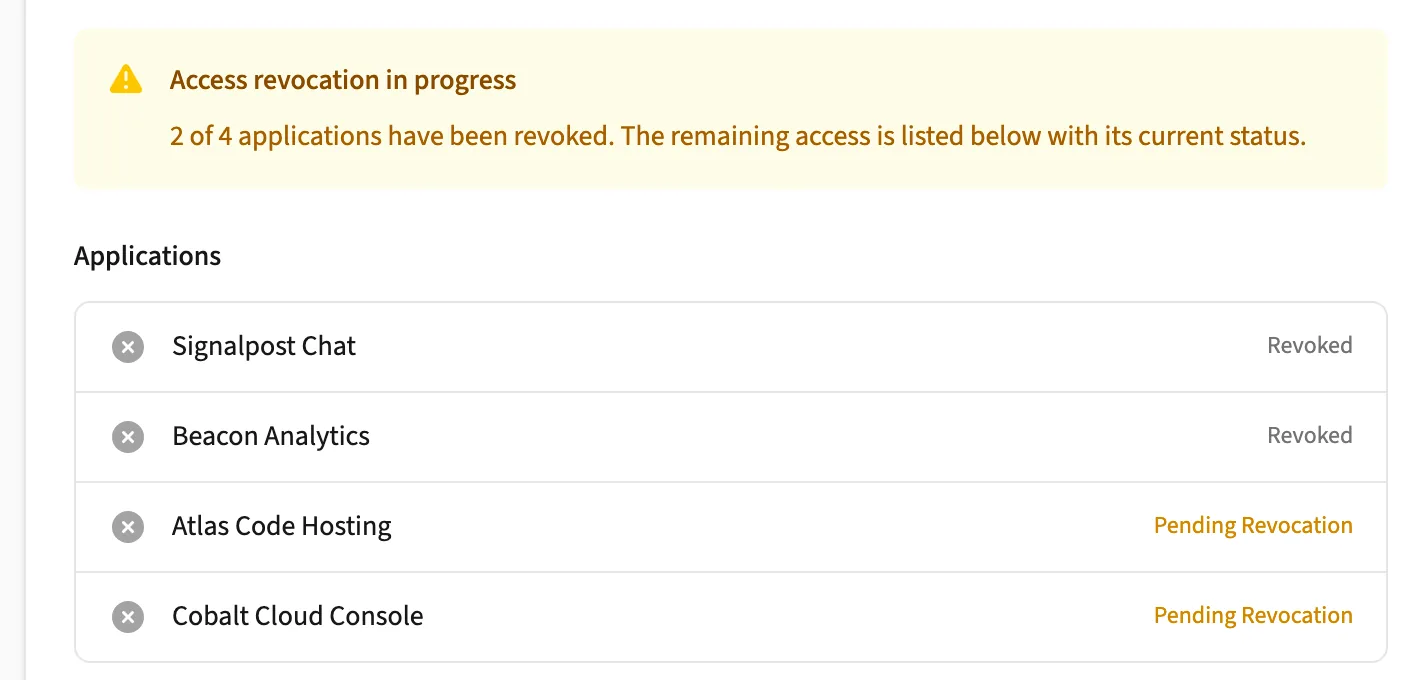
When someone leaves, an Organization Admin starts their offboarding. SoftTrak withdraws their pending requests and opens a removal task for every application they use, assigned to that app's owner.

For your team
Departures follow the same tracked steps every time, with progress you can see at a glance.
For your organization
Leavers stop being a spreadsheet someone has to remember.
SoftTrak offboarding progress with a removal task per application, sample organization
Sample organization: Larkspur & Co.

A full history, ready when you're asked

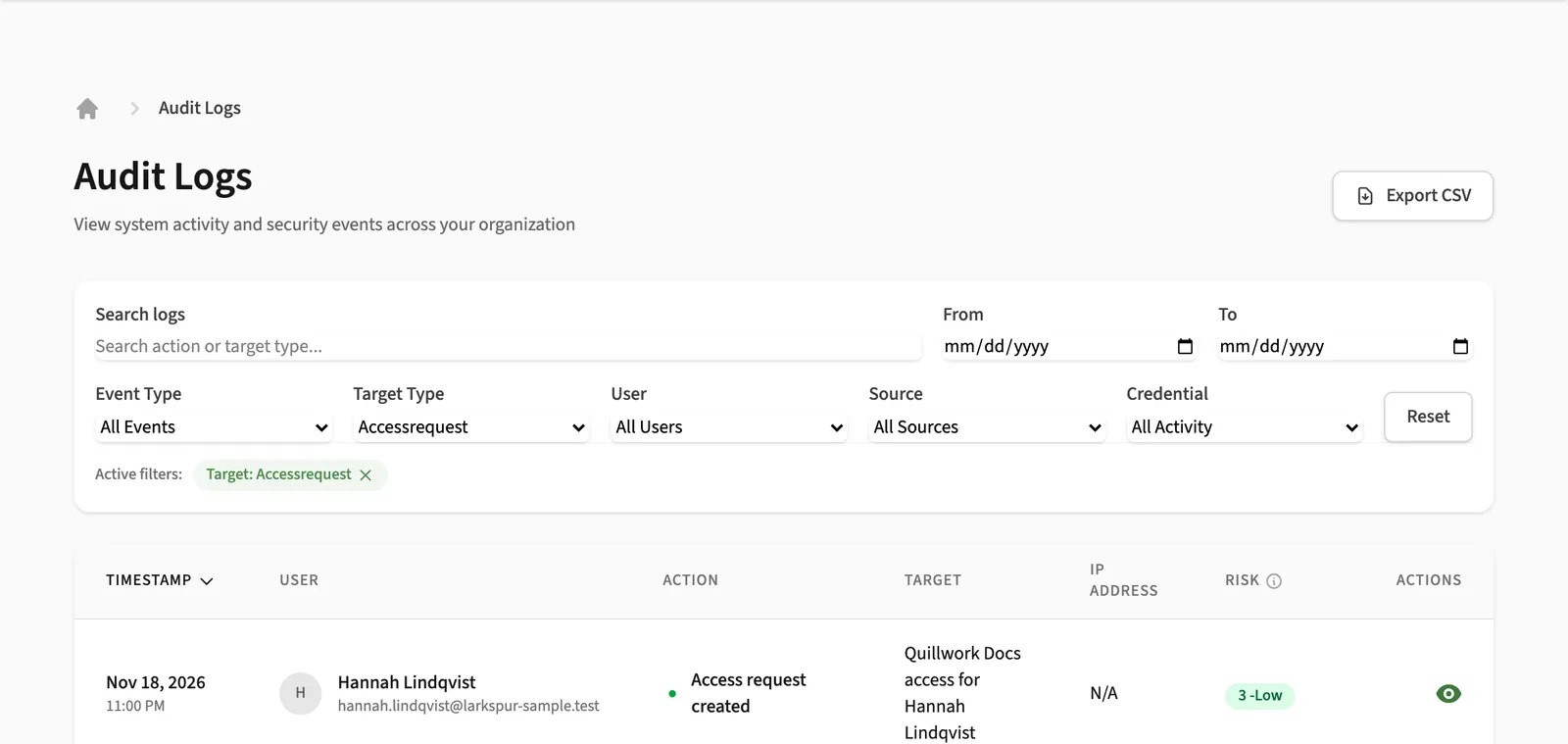
Every request keeps a full timeline and comment thread. Admins can search the audit log and export it to CSV, and managers can export their team's access.

For your team
Answer "who approved this?" in seconds, not an afternoon.
For your organization
Evidence for audits and reviews is already written down.
The SoftTrak audit log for the sample organization
Sample organization: Larkspur & Co.

Single sign-on and provisioning

Single sign-on through SAML 2.0 or OpenID Connect, and SCIM 2.0 provisioning from your identity provider, set up per organization.

  • SAML 2.0
  • OpenID Connect
  • SCIM 2.0
  • Microsoft Entra ID
  • Okta
  • Google Workspace
See everything SoftTrak does 22 capabilities, grouped

Catalog

  • Application catalog with search and filters
  • Requests to add an application to the catalog
  • Departments, and which departments may request each app
  • Access levels and license pools per application, with cost per seat and renewal dates
  • Business, technical and access owners for every application

Requests and approvals

  • Multi-stage approval paths with approver roles you define
  • Bulk approve, reject and reassign
  • Overdue warnings when a request waits too long
  • Out-of-office approval delegation, set up per organization
  • Time-limited access with an end date and a reminder before it lapses
  • Withdraw a request you no longer need

Joiners and leavers

  • Guided onboarding for new team members, including bulk onboarding
  • Offboarding with a removal task for every application the person uses
  • Retiring an application through an approved decommission request
  • Bulk access grants and user import from CSV

Visibility

  • Email notifications at each step, which each person can turn off
  • Dashboards for your requests, your approvals and your team
  • Searchable audit log with CSV export
  • Team access export for managers

Identity and support

  • Single sign-on (SAML 2.0 or OpenID Connect) and SCIM 2.0 provisioning
  • Authenticator-app MFA with backup codes
  • In-app help articles and a way to report a problem

Built for the people involved

Everyone has a clear part to play.

Three colleagues working at laptops around a shared table
  • Employees

    Request apps, follow progress, and ask for access to be removed.

  • Managers

    Approve their team's requests, ask for removals for direct reports, and export their team's access.

  • IT administrators

    Manage people, the app catalog, approval paths, single sign-on and offboarding.

  • Application owners

    Carry out approved changes in their application and mark them done.

  • Business owners

    Approve requests for the applications they are accountable for.

Security and administration

Controls your security team will ask about.

The detail, including what SoftTrak does not do, is on one page.

Read Security & trust
  • Single sign-on and SCIM provisioning with Microsoft Entra ID, Okta or Google Workspace.
  • Authenticator-app MFA that an Organization Admin can require for password sign-ins.
  • An append-only audit log that the database itself will not let anyone edit or delete.
  • Encrypted connections everywhere, with sign-in secrets and identity-provider credentials encrypted in the database.

FAQ

Questions buyers ask first.

Who is SoftTrak for?

IT and security teams at growing and mid-sized organizations that want software access to follow a clear, recorded process instead of an inbox.

Can we sign up on the website?

Not yet. We set up each organization together with you, so there is no self-service sign-up today.

Can we customize approval workflows?

Yes. Approval paths are built per organization, step by step, and you can create approver roles that match how your teams work.

Does SoftTrak work with our identity provider?

SoftTrak supports single sign-on with Microsoft Entra ID, Okta and Google Workspace over SAML 2.0 or OpenID Connect, and SCIM 2.0 provisioning. Your Organization Admin sets these up in SoftTrak's settings.

Does SoftTrak change accounts inside our other applications?

No. SoftTrak routes, records and tracks each change. The application's Access Owner makes the change inside that application and marks it done, so every grant and removal has a name against it.

How do we get started?

Tell us a little about your organization through the contact form and we'll set up a conversation.

Talk with us about SoftTrak.

Tell us how access works in your organization today. We'll walk through a request with you, from the first ask to the day it ends.